Loyalty · Promotions · Gamification
Ship screens, not releases.
Your product team builds a screen in a visual editor and publishes it. The app shows the new screen right away — no build, no store review.
- No store release
- Your users’ data never passes through us
- SDKs for React and Flutter
Live screen
Tap the screen — it’s live
What your code receives
Tap a button on the screen. Every action, analytics event and screen change arrives in your code — the document never runs anything by itself.
Not a picture: a published document, drawn by the same React SDK an app would ship.
How it works
Three steps, and none of them is a release.
Compose
A manager assembles the screen from 28 widgets on a phone-sized canvas, binds them to data your backend already returns, and sets when each part shows.
Publish
One button, for the people allowed to press it. The document is checked against the contract first; every publication is kept, compared with the draft and can be rolled back.
The app shows it
The reader inside your app draws the published document in your theme and your user’s language. Nothing is rebuilt, and nothing waits for a store.
Ways to run it
Where the editor runs, and where your screens live.
HotLayout has two parts: the editor, where your team builds and publishes screens, and a reader SDK inside your app that draws them. Here is where the editor can run today.
Available now
HotLayout Cloud
You sign in to a workspace we host: an organisation, projects, roles, the editor, publishing and history. There is nothing to install.
Layouts, themes and media are stored in HotLayout Cloud.
Available now
The editor inside your admin
The same editor, embedded in your own back office as a web component. Sign-in, language and theme come from you, so your team never sees a second login.
<hotlayout-builder>Only the editor moves into your page. Layouts, themes and media are still stored in HotLayout Cloud.
Either way, your app can show screens without our cloud.
Turn on the webhook, and every publication is sent to your backend with a signature. Your app then gets screens from your own servers, together with your users’ data — and none of that data passes through HotLayout.
The editor
Built for the person who owns the screen.
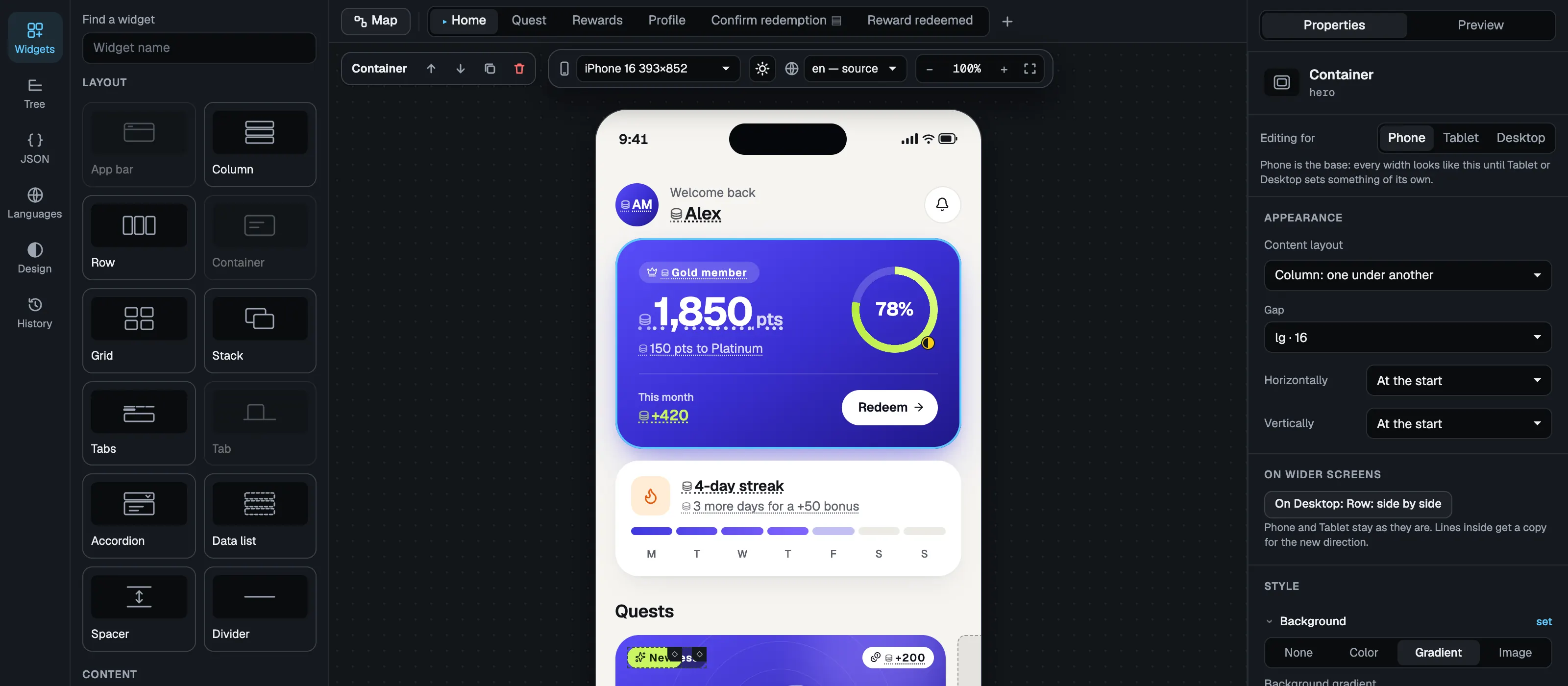
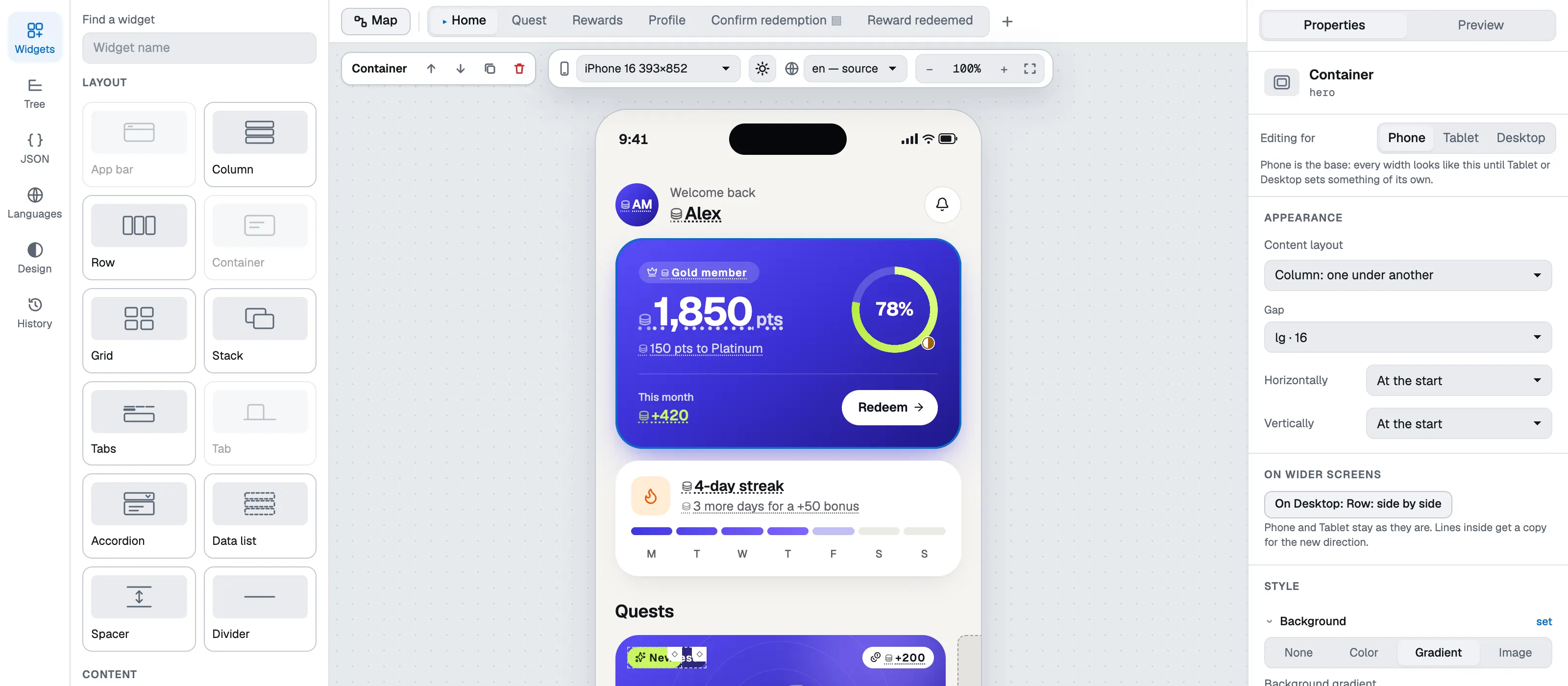
Not a form over JSON. A canvas, a phone and the properties of whatever is selected — the screenshots below are the editor itself, with a rewards screen open.
Drag widgets onto the phone. Style comes from your theme tokens first; a custom value is one step away when a design needs it.
What a screen can do today
Enough to build the screen your designer drew.
28 widgets
Layout, text, images, lists, grids, tabs, carousels, progress bars and rings, an app bar and a bottom navigation bar.
Data from your backend
Bind text, images and conditions to fields you already return. One template draws a whole list from a collection.
Conditions and states
Show a block, or restyle it, when a task is locked, in progress or done — without duplicating the screen.
Themes and tokens
Light and dark themes, your own tokens, and a custom value where a token does not fit.
Languages and right-to-left
Translations and plural forms in the document; numbers, dates and currency in the user’s locale; a mirrored layout for right-to-left scripts.
Actions and navigation
Screens, modal layers, deep links and analytics events. What an action does stays in your code.
Forms
Text and number fields, switches, checkboxes and choice groups, with required fields and a button that waits for them.
History and rollback
Every publication is a snapshot. Compare it with the draft in plain words and bring any version back.
Roles and access
Owners, admins, publishers, editors and viewers in an organisation: editors prepare, publishers release.
For developers
One component in your app. The rest is data.
The reader takes a document, a theme and your data. Navigation, analytics and whatever a button does stay in your code — the document only says which action was asked for.
A contract, not a canvas
The editor and the readers follow one versioned JSON Schema. What the schema cannot say does not exist in the editor, so it cannot produce a document your app cannot draw.
Flutter and React readers
The same document is drawn by a Flutter package and a React package, checked against shared tables of cases. Both are available on request while they are being prepared for release.
Old apps, newer documents
Schema, theme and data dictionary are versioned separately. What an installed app does with a document newer than itself is decided by the compatibility policy, not by chance.
Documents are untrusted input
The reader never opens an address by itself, checks every value that becomes a style or an image source, and keeps a broken document from taking your app down.
Delivery through your backend
Each publication can be sent to your server as a signed webhook (HMAC-SHA256). Your app gets screens from you, together with the user’s data — nothing about your users passes through us.
import { HotlayoutScreen } from '@hotlayout/react'
import type { ThemeContract, UiDocument } from '@hotlayout/react'

export function Rewards({ layout, theme }: { layout: UiDocument; theme: ThemeContract }) {
  return (
    <HotlayoutScreen
      document={layout} // the layout document, parsed JSON
      theme={theme} // the project theme, parsed JSON; omit it to use the built-in one
      data={{ 'user.firstName': 'Ada', 'user.points': 1250 }}
      collections={{ items: [{ name: 'Coffee', price: 300 }] }}
      locale="en"
      style={{ minBlockSize: '100dvh' }}
      onAction={(action, source) => {
        console.log('the user asked for', action.type, action.params, 'on', source.nodeId)
      }}
    />
  )
}
POST /your-webhook
x-webhook-event: document.published
x-webhook-delivery: <documentId>/<stamp>
x-webhook-signature: t=<seconds>,v1=<hex>

{
  "event": "document.published",
  "documentId": "autumn-rewards",
  "document": { … },
  "dataContract": { … }
}
Where teams use it
Screens that change more often than the app does.
Gamification
Quests, rewards, levels and streaks — the case HotLayout was first built for.
Promotions and offers
A campaign screen that starts on the day marketing planned, and ends when it ends.
Surveys and forms
Questions, choices and inputs that write back to your app, changed without a build.
Onboarding
Steps you can rewrite, reorder and translate while the same app version is in users’ hands.
What it does not do
Honest limits.
It does not ship code.
A document describes layout, content, conditions and named actions. Logic stays in your app.
It does not fetch your data.
The reader takes data from your app and never calls your backend by itself.
It does not describe animation.
The contract says what to show; how it appears is the reader’s business.
Pricing
One price per app. No per-user fees.
A licence is counted by the apps that read your screens, not by the people who use them. Your users’ data never passes through HotLayout, so we never count it.
Pilot
€3,000
one-off, up to 3 months
A real integration into your app: together we build the screen you release most often, wire up the SDK and ship it to production.
- 1 app, up to 5 screens in production
- Up to 5 people in the editor
- Up to 40 hours of our work on the integration
- Credited in full towards the licence
App licence
from €6,000
per year for one app
Everything your team needs to build, publish and roll back screens of one app — however many people use that app.
- No limit on the number of screens
- Up to 10 people in the editor
- HotLayout Cloud or the editor inside your admin
- Delivery from our storage or by signed webhook
- Flutter and React SDKs, version history and rollback
For partners
On request
model: integration + per client
For loyalty, gamification and CRM platforms that embed the editor in their own product and offer it to their clients. You pay once for the integration, then a fee for each client of yours.
- The editor inside your product, with your sign-in, language and theme
- A separate workspace for each client of yours
- SDKs and webhooks for your clients’ apps
Want to try it yourselves first? We set up a workspace with your theme for 14 days.
Several apps in one organisation are quoted separately. Prices exclude taxes.
FAQ
Frequently asked questions.
Short answers about data, availability, security and control.
Does our customers’ data pass through HotLayout?
No. A screen document names data paths such as user.firstName; the values travel from your own backend to your own app at the moment the screen is shown. HotLayout stores layouts, themes, media and the data dictionary, which is a description of fields. One caveat: the dictionary holds sample values that your team types in for the preview, so use made-up ones.
What happens to our app if HotLayout is unavailable?
Your app does not have to ask us for anything when it shows a screen. With the webhook, every published document is sent to your backend and served from your own infrastructure. The readers expect a bad day too: the Flutter reader draws a copy bundled with the app when the network gives nothing usable, and the React loading example keeps the screen it already has. While HotLayout is down you cannot publish a change; what is already published keeps working. The direct address, meant for prototypes and small apps, is the exception: it reads from our storage.
Can a layout run arbitrary code in our app?
No. A document is data: a closed vocabulary of widgets and named actions, checked against a JSON Schema — not a script. The reader treats the document and the theme as untrusted input: every value is checked by its form before it becomes a style or an image address. It never opens a link by itself; addresses and deep links are handed to your code, which decides what is allowed.
What happens to older versions of our app when a layout is updated?
Every document carries the version of the contract it was made for. Within one major version an older app draws a newer document: a minor version only adds optional things, and what a reader does with anything it does not know is written down in the compatibility policy. A document of another major version is not drawn at all — the Flutter reader falls back to the copy bundled with the app — so a breaking change does not reach an app that cannot read it.
How do we know a published document really comes from you?
Every webhook request is signed with HMAC-SHA256 using the secret of your project. The secret is shown once, when the webhook is turned on, and cannot be read back afterwards. Your backend checks the signature over the timestamp and the raw body before it accepts a document.
What about languages, right-to-left scripts and accessibility?
Translations and plural forms live in the document; numbers and dates follow the user’s locale, and the layout mirrors for right-to-left scripts. The web reader draws real buttons, inputs, tabs and dialogs, with keyboard support, a visible focus ring and ARIA roles, and the editor does not publish a button without an accessible name. Colour contrast depends on your theme, and alternative texts on whoever builds the screen.
Can we run HotLayout in our own infrastructure?
Not today: HotLayout runs in our cloud. The editor can be embedded in your own admin, but layouts are still stored with us. Full hosting in your own infrastructure is on request — we discuss it with you.
How much does it cost?
A licence for one app starts at €6,000 per year, however many people use the app. We start with a paid pilot of up to 3 months for €3,000: it is credited in full towards the licence and includes integrating the SDK into your app together with us. Several apps in one organisation are quoted separately.
See it on your own screen.
Tell us which screen you keep releasing for. We will show how it is built in HotLayout and what the integration takes in your app.